TradersPost vs. CrossTrade Alert Messages: Understanding the Difference
Compare alert formats and execution routes, then translate a TradersPost workflow to CrossTrade with the right account, order and exit settings.


TradersPost and CrossTrade both route TradingView alerts to trading accounts. The important differences are the account connection, payload fields, exit management and tools included with the plan. CrossTrade offers both a running NinjaTrader 8 Add-On route and direct Tradovate cloud routing.
This article focuses on translating alert messages and choosing the correct execution route. For current buying criteria, see CrossTrade versus TradersPost; for a move between services, use the TradersPost migration checklist.
CrossTrade publishes this comparison. Brokerage account connectivity is different from controlling the NinjaTrader 8 desktop. Product and plan descriptions were reviewed against TradersPost's connection pages and pricing page on October 10, 2026.
Already Using TradersPost? Bring Your Alerts With You
CrossTrade's Command Builder includes a JSON Converter for supported vendor payloads. Paste the existing message, inspect the converted account, action, quantity and exit fields, and review every warning. Conversion changes the message format; it does not guarantee that strategy settings on two services behave identically.
After conversion, add only the controls your workflow needs, such as Strategy Sync or flatten_first. Test the original entry, reversal and exit sequence on Sim or Demo before replacing the existing execution path.
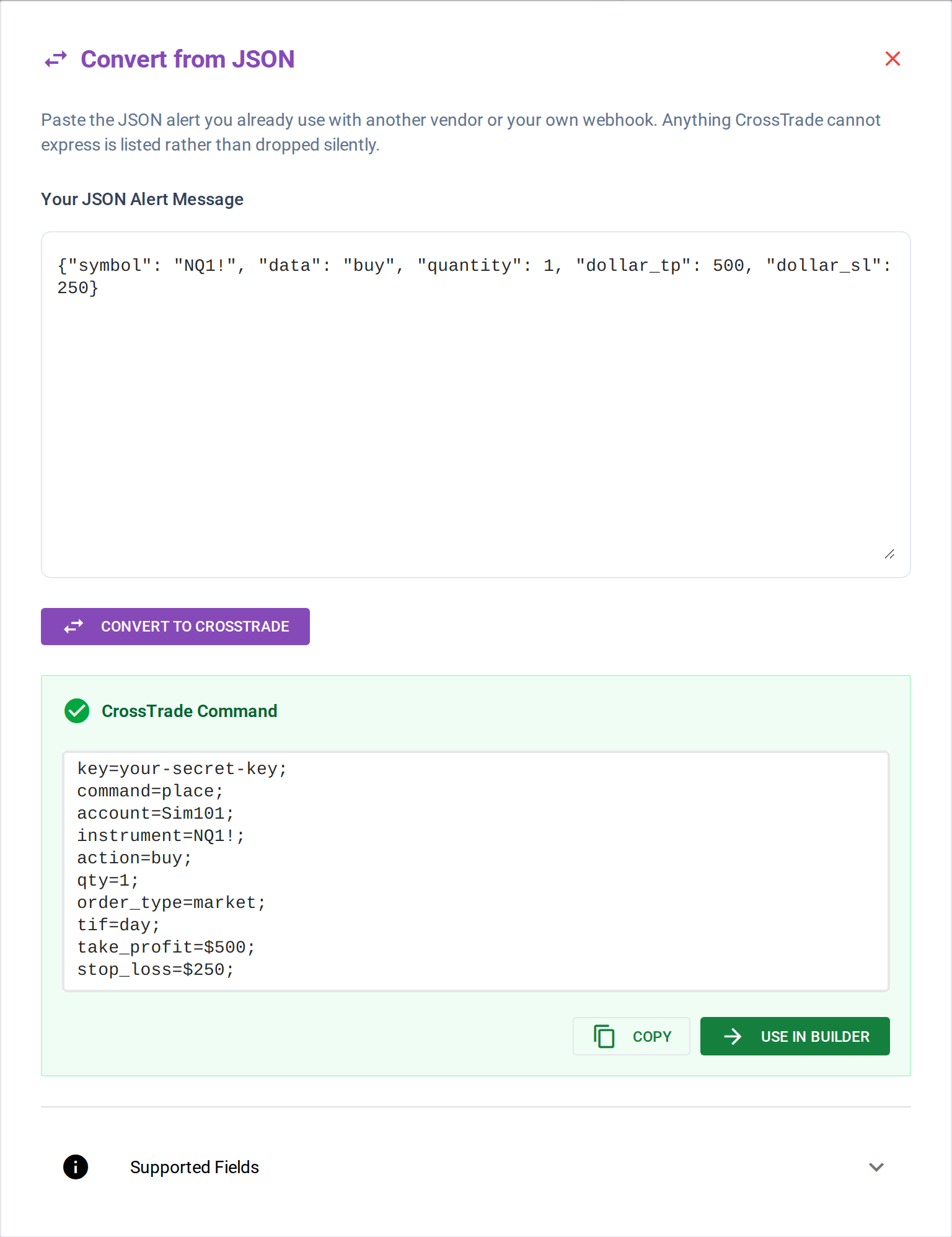
Paste your JSON alert and get a CrossTrade command back
Try CrossTrade free for 7 days — full access, unlimited alerts, no credit card required.
Architecture: NT8 desktop control or direct cloud routing
This is the core difference and everything else flows from it.
For desktop-connected accounts, CrossTrade sends requests through the NT8 Add-On inside a running NinjaTrader 8 instance. This route exposes supported platform operations and local ATM templates. For linked Tradovate accounts, destination=tradovate selects direct cloud execution, with no NT8 installation required.
TradersPost publishes NinjaTrader brokerage and Tradovate account connections. Those should not be treated as control of every account and strategy object inside your local NT8 desktop. Check the current account support for the route you intend to use.
A local NT8 ATM template belongs to the desktop platform. Tradovate also has native broker-side brackets and order strategies, and CrossTrade supports named cloud templates for them. Both routes can manage exits, but their template ownership, fields and runtime requirements differ.
Execution Speed
CrossTrade's published NT8 timing figure measures its own webhook-to-platform delivery segment. It does not include every delay before alert delivery or prove the time to a broker fill. Treat it as a scoped pipeline measurement.
We have not run a controlled, like-for-like fill-latency comparison against TradersPost. Different account routes, brokers, order types and network conditions make headline millisecond figures insufficient to rank execution quality.
For a time-sensitive strategy, compare the same order sequence in the appropriate test environment and inspect accepted orders and fills separately. Include rejected orders and disconnect recovery in the evaluation.
For a detailed breakdown of how CrossTrade measures and optimizes execution speed, see How Fast Is CrossTrade.
Webhook Format
Both platforms accept webhook payloads from TradingView, but the formats differ.
TradersPost uses JSON (JavaScript Object Notation). Alert messages must follow a structured JSON format with specific key names and data types:
{
  "ticker": "NQ",
  "action": "buy",
  "quantity": 1,
  "orderType": "market"
}
CrossTrade accepts both semicolon-delimited key=value messages and flat JSON objects using CrossTrade field names. Here is the text version; the JSON format guide shows the equivalent object.
key=your-secret-key;
command=PLACE;
account=sim101;
instrument=NQ1!;
action=BUY;
qty=1;
order_type=MARKET;
tif=DAY;
JSON versus text is packaging, not a feature boundary. CrossTrade fields such as take_profit, stop_loss, sync_strategy and require_market_position retain the same meaning in either format. Check destination compatibility for broker-specific support; max_positions limits concurrently held instruments, not contracts.
The Command Builder can generate a new message or convert supported vendor fields. Do not send an unchanged TradersPost JSON object to CrossTrade: the JSON parser expects CrossTrade's field names.
Feature Comparison
Here's where the architectural difference shows up in practice.
What Both Platforms Do
Both TradersPost and CrossTrade handle the core automation path: receive a TradingView webhook, parse the order details, and submit a market or limit order to your NinjaTrader/Tradovate account. Both support basic take profit and stop loss parameters, and both work with TradingView's dynamic variables like {{strategy.order.action}} and {{ticker}}.
CrossTrade capabilities to match to your workflow
ATM Strategy Templates. Because CrossTrade executes inside NT8, it can attach any ATM Strategy template you've built in NinjaTrader directly to an incoming order. Your custom bracket configurations, trailing stops, and multi-stage exit plans all work exactly as they would with a manual trade. A cloud API can place TP/SL orders, but it can't load your NT8 ATM template.
Strategy Sync compares the requested strategy transition with the live account position. NT8 checks use the Add-On; direct Tradovate checks run server-side. Choose wait, flatten, ignore or resync deliberately and use the synchronization reference for the exact behavior.
Strategy Lock. When running multiple automations on the same NT8 account, Strategy Lock tags each position with its source strategy so they can't interfere with each other. Strategy A's exit won't accidentally close Strategy B's position. This is managed entirely within NT8's local execution context.
Account Manager adds per-account P/L thresholds, session controls and Tandem integration with copying. NT8 and direct Tradovate monitors have different runtime and enforcement details. Follow the NT8 setup walkthrough or the Tradovate reference for the selected route.

CrossTrade's NT8 trade copier serves desktop-connected accounts with Order and Execution modes. The separate cloud Tradovate copier offers Signal, Execution and Order (beta) modes. Account-list fan-out is different from copying later manual activity on a leader.

Multi-Account Placement. A single CrossTrade webhook can target multiple NT8 accounts simultaneously by comma-separating the account field (account=sim101,sim102,sim103). One alert, one webhook, multiple executions. No need for duplicated alerts or separate configurations per account.
Continuous Contracts. CrossTrade automatically converts TradingView's continuous contract format (ES1!, NQ1!) to NinjaTrader's expiration format (ES 06-26). Set your alerts once and never update them on contract rollover.
Advanced controls include position gates, trading windows, bracket management and alert rate limits. Their names are not interchangeable: max_positions caps concurrently held instruments, while copier quantity limits constrain follower sizing. Use the command reference when mapping a strategy setting to a field.
Where TradersPost may fit better
TradersPost publishes a broader broker and asset-class lineup, including stocks, options, futures and crypto. CrossTrade focuses its current product workflows on NT8-connected accounts and direct Tradovate. Verify the exact broker connection rather than inferring support from an asset-class label.
TradersPost's current pricing page lists private strategy templates on Pro and above. CrossTrade Signal Share is a different feature: copying your own trades between your own NT8 installations. It is not a marketplace for distributing a strategy to other traders.
Pricing
TradersPost's current pricing page describes a seven-day trial, account counts by tier, and separate add-on prices for live and paper accounts. Annual and monthly displays differ. Use the current vendor pricing page to price the account types you actually need rather than treating every evaluation account as a live-account add-on.
CrossTrade Standard starts at $29/month for webhook automation. Pro at $49/month adds the trade copiers, Account Manager and REST access; Elite adds MCP and Signal Share broadcasting. Compare current plans using the required features, not just the entry price.
Test the behavior your strategy depends on
A useful test covers an entry, an exit, a reversal and any bracket changes on the same intended route. Review the received message, order status and resulting account state. A fast acknowledgement is not proof that an order filled or that every follower is protected.

Practical Example: Comparing a Simple Alert in TradersPost vs. CrossTrade
Here is a simple market-entry translation. The two services use different field names. Broker-side stop and target settings must be reviewed separately rather than assumed to carry across with the entry.
- TradersPost JSON example:
{
  "ticker": "NQ",
  "action": "buy",
  "quantity": 1,
  "orderType": "market"
}
In TradersPost, your JSON must explicitly state each parameter in structured JSON format.
- CrossTrade simplified example:
key=your-secret-key;
command=PLACE;
account=Sim101;
instrument=NQ1!;
action=BUY;
qty=1;
order_type=MARKET;
tif=DAY;
The CrossTrade example targets NinjaTrader 8. To use direct Tradovate, select a linked Demo account and add destination=tradovate. Brackets need their own take_profit/stop_loss or ATM fields. Confirm every converted price and unit with the bracket documentation before testing the complete exit workflow.
Who Should Use Which
Choose TradersPost if you trade multiple asset classes (stocks, options, crypto) across different brokers and need a single platform to route all of them. TradersPost's broker diversity is its strongest advantage.
Choose CrossTrade when the NT8 desktop route or direct Tradovate integration fits your accounts and you want copying, account controls and API access alongside TradingView webhook automation. Choose by the required workflow and current plan terms; there is no universal execution-speed winner established by this comparison.