CrossTrade vs Replikanto: NinjaTrader 8 Trade Copier Comparison
A detailed comparison of CrossTrade and Replikanto trade copiers for NinjaTrader 8, covering architecture, synchronization, prop firm compliance, TradingView integration, and pricing.
Replikanto from FlowBots is an established NinjaTrader 8 trade copier with seven documented sizing methods, ATM Copy and local or remote-node workflows. CrossTrade combines NT8 copying with webhook automation, account controls and a separate direct Tradovate route. The useful comparison starts with where your accounts run and what the followers need to copy.
This post breaks down how the two copiers differ architecturally, where each one has the advantage, and which one fits your trading setup.
CrossTrade publishes this comparison. Product details were reviewed on October 10, 2026 against FlowBots' Replikanto product and licensing page and CrossTrade's current documentation. For a concise buying checklist, see CrossTrade versus Replikanto.
The Fundamental Architecture Difference
This is the most important section in this comparison because every other difference flows from it.
Replikanto runs as a NinjaTrader 8 add-on. Its current product page documents local copying plus network and internet nodes, with NT8 and a license on each participating machine. Desktop copying depends on the platform and broker connections being available; that requirement applies to CrossTrade's NT8 route too.
CrossTrade stores copier configuration in its web application and uses the connected NT8 Add-On to carry out desktop operations. You can manage settings from a browser while NinjaTrader remains the execution platform. Direct Tradovate copying is a different server-side route, not a way to keep an offline NT8 instance trading.
Persisted configuration reduces setup work after a restart, but recovery still requires valid connections and reconciled positions and working orders. Check the actual account state before resuming a workflow after a platform interruption.
CrossTrade exposes Auto-Sync, reconnect controls and Tandem Mode as separate settings. Their value is the behavior you can test on your accounts, not a promise that hosting the dashboard removes every desktop failure mode.
Synchronization: Reactive vs Continuous
This is where the architectural difference shows up most clearly in practice.
Replikanto's Follower Guard can cancel an unfilled entry, flatten or disarm an out-of-sync follower, act on broker rejections and send email alerts. FlowBots also documents Rithmic broker-position checks and exit-stop protection. Review the enabled settings rather than assuming every recovery action runs by default.
CrossTrade's Auto-Sync checks follower positions on a configurable timer and can submit corrective orders under the selected rules and rate limits. Test a mismatch and a reconnect on simulation accounts. A correction can create a new trade, so understand when it should be allowed before enabling it.
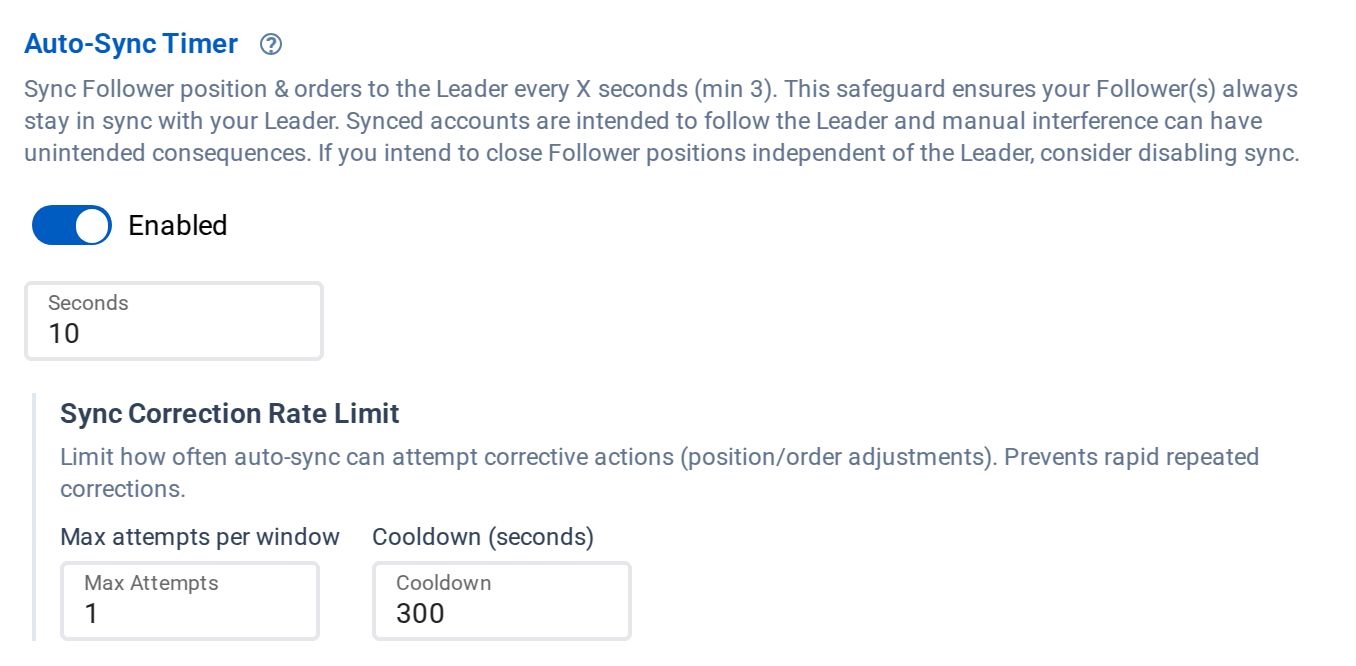
Auto-Sync checks followers on a timer and corrects drift
A recurring position check and a flatten-and-disarm response solve different problems. Choose the response you want when a follower no longer matches; neither removes the need to inspect failed or rejected actions.
For a fair comparison, use the same leader, follower size and order sequence. Test a partial fill, a stop move, a rejected order and a reconnect, then compare the resulting positions and working orders.
Copy Relationship Structure
Replikanto configures a leader account and instrument per tab, with multiple followers and additional tabs or nodes for other account relationships. Its product page also documents loop prevention. Verify the topology you need rather than treating every leader/follower arrangement as one fixed layout.
CrossTrade configures copying relationships between NT8 accounts with sizing and instrument filters per relationship. For multiple leaders, map the instruments deliberately and avoid overlapping paths that duplicate exposure. Complex account graphs require a full entry-and-exit test.
For a trader running one leader to five followers, both copiers handle it fine. The difference shows up when your setup gets more complex.
Copy Method Variety
Replikanto documents Exact Quantity, Pooled Quantity, Ratio, Pre Allocation, Net Liquidation, Available Cash and Pct Change. FlowBots describes the last three as stock-account methods; verify that a method applies to your asset and account before selecting it.
CrossTrade provides ratio or fixed sizing and maximum-position controls. Combine those settings with the instrument mapping you intend to trade, then verify entry and exit quantities on each follower. Auto-Sync does not turn a misconfigured ratio into the right risk allocation.
Replikanto wins on copy method variety. If you need net-liquidation-based distribution or percentage change scaling, Replikanto has it and CrossTrade doesn't.
Copier Groups
When you're managing five, ten, or twenty prop accounts from one leader, configuring each copying relationship individually becomes tedious. CrossTrade's Copier Groups let you manage multiple follower relationships as a single unit. Start, stop, or adjust settings for an entire group with one click instead of touching each copier instance.
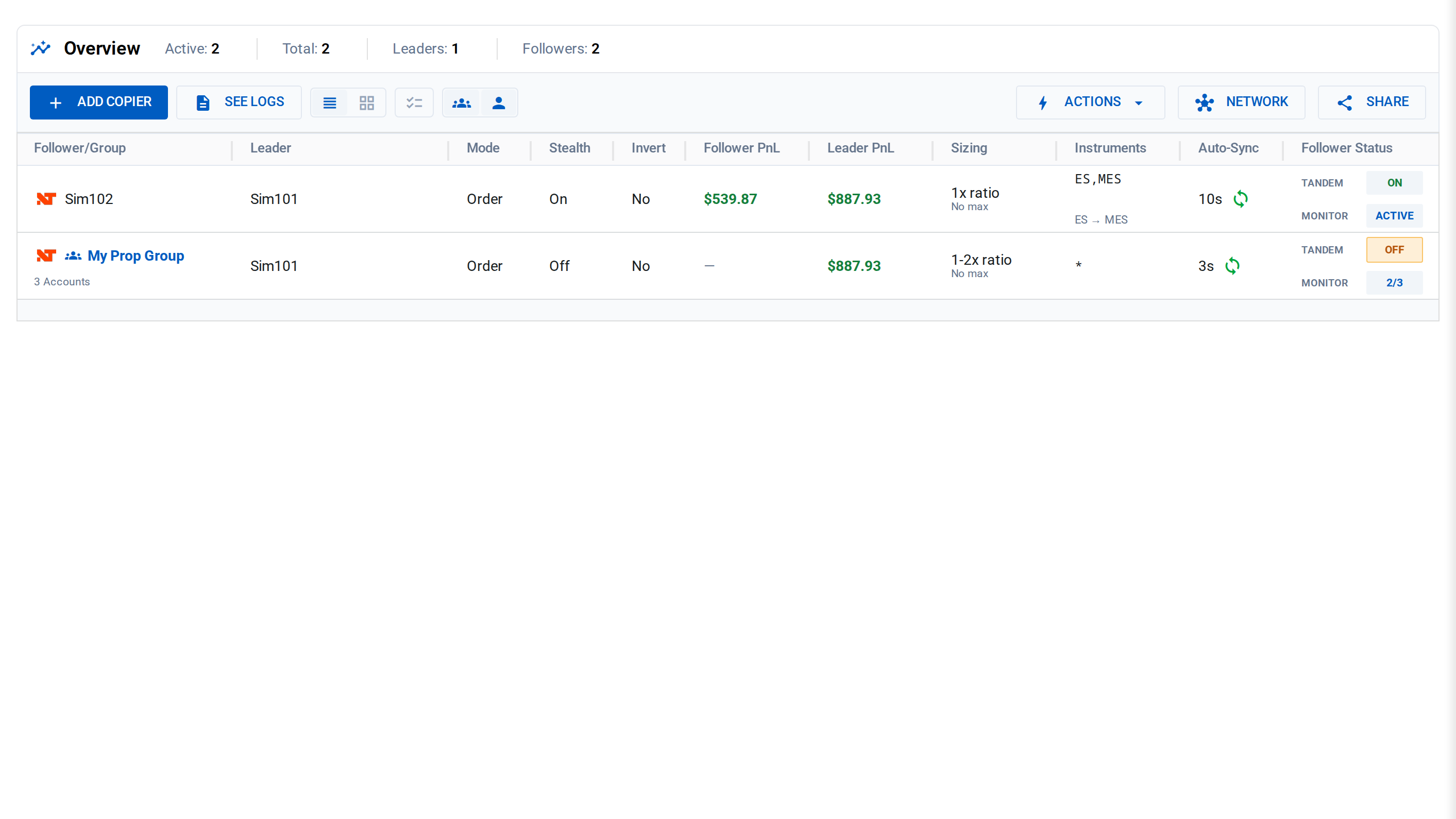
A one-to-one copier and a group copier on one page
CrossTrade's named groups are managed in the dashboard. Replikanto presents followers together in a leader/instrument tab, with per-follower controls and export/import options. Compare the day-to-day editing workflow rather than calling one of them ungrouped.
Tandem Mode
CrossTrade's Tandem Mode binds a copier to Account Manager state. Configure the associated monitors and test what happens when one stops. Account thresholds, stop orders and copier state are different controls; confirm both positions and orders after a trigger.
Follower Guard is Replikanto's documented response to synchronization and order failures. CrossTrade's Account Manager adds session-level P/L rules with Tandem integration. Decide which trigger and resulting action your workflow needs.
Reconnect Delay
When a leader account's broker connection drops and reconnects, NT8 fires a burst of order and position events as it re-syncs internal state. Without protection, a copier interprets these as real trades and replicates them to followers — creating duplicate entries and phantom positions.
CrossTrade's Reconnect Delay suppresses all copier activity for a configurable cooldown window after a leader reconnection. Set it to 5 seconds and the copier ignores everything from that leader for 5 seconds after reconnection, letting NT8 stabilize before copying resumes.
Reconnect handling is a lifecycle test, not a checkbox to infer from marketing. Verify that existing orders are reconciled and no follower receives an unintended duplicate after the connection returns.
Stealth Mode
Both copiers now offer stealth functionality, though the implementations differ.
Replikanto added Stealth Mode in version 1.6+. It removes automation identifiers from copied orders.
CrossTrade uses neutral order names and persists order mappings for recovery. Stealth does not remove your obligations to a broker or firm and is not a guarantee of undetectable automation. Replikanto also documents Stealth Mode; test restart behavior on the versions you use.
TradingView Integration
CrossTrade can copy eligible TradingView-panel activity that reaches a Tradovate-connected leader in NT8. Use Order mode when the follower must mirror working orders and their changes; an alert-driven webhook is a separate signal source.
Beyond manual trading, CrossTrade's core product is the webhook automation bridge from TradingView to NT8. Strategy alerts, indicator signals, and manual chart trades all flow through the same infrastructure into your NT8 accounts.
FlowBots explicitly documents copying trades from Tradovate web, mobile and TradingView when the leader is a Tradovate account. CrossTrade additionally provides its own webhook receiver and direct cloud Tradovate route. Manual-panel copying and webhook automation should be compared separately.
Symbol Replacement
Both copiers handle mini-to-micro conversion. Trade ES on the leader, copy as MES on the follower.
Replikanto uses pre-defined Cross Order instrument pairs (ES↔MES, NQ↔MNQ, YM↔MYM) that you can customize. Solid implementation.
CrossTrade supports symbol replacement, but the contract choice and quantity ratio still determine exposure. Reconcile the dollar value per tick and the resulting quantity rather than assuming ES-to-MES replacement alone preserves risk.
The implementations are comparable. Both get the job done.
Execution Modes
Both copiers offer two primary modes:
Replikanto: Standard order copying (replicates pending orders, modifications, cancellations) and Market Only mode (converts everything to market orders on execution).
CrossTrade: Order Mode (full order replication) and Execution Mode (market orders on fill). CrossTrade lets you assign different modes per copying relationship, so your precise strategy runs in Order Mode while your scalping setup uses Execution Mode.
Both products expose per-follower behavior choices. Compare order mirroring, execution copying and ATM ownership using the lifecycle you actually trade.
Trade Inversion
Both products support inversion with mode-specific rules. CrossTrade supports inversion in NT8 Execution mode or Order mode with Fills Only enabled. FlowBots documents negative ratios and the transformation of priced orders. Check the supported order types before treating the two configurations as equivalent.
Network and Remote Mode
Replikanto supports Network Node Mode over a local network and Remote Node Mode over the internet. Each machine needs NT8 and a license; internet copying consumes Submit credits. Check current license, support and credit terms on FlowBots' product page.
CrossTrade's local copier serves accounts inside one NT8 instance. Signal Share is available for copying your own trades between separate NT8 installations. Broadcasting requires Elite; receiving installations need their own connected NT8 Add-On and CrossTrade login.
These are different remote-copy designs. Replikanto offers network and internet order-copy nodes; CrossTrade Signal Share is for accounts you own and control across your installations. Compare the entry, exit and order-management behavior you need, not just whether both products say remote.
Pricing
Replikanto: FlowBots' public Replikanto product page currently displays a $0 to $399 price range. License options and multi-machine or remote-mode requirements can vary by configuration, so verify the current machine count, support term, and any remote-mode credits directly with FlowBots before purchase.
CrossTrade: Included with the Pro plan at $49/month, which also includes webhook automation, the NinjaTrader Account Manager, Strategy Sync, the REST API, and all future updates.
Compare the total cost for your actual setup: local copying, remote machines, updates and any required account controls. CrossTrade Pro includes local copying, Account Manager and REST access; Elite adds Signal Share broadcasting and MCP. Replikanto offers term and machine-count options, with separate internet-copy credits.
Summary
| Feature | CrossTrade | Replikanto |
|---|---|---|
| Architecture | Web configuration + connected NT8 execution | NT8 add-on; network and internet nodes available |
| Synchronization | Configurable Auto-Sync and correction limits | Configurable Follower Guard and broker checks |
| Copy methods | Ratio-based with max limits | 7 methods (ratio, net liq, etc.) |
| Multi-directional copying | Per-relationship account and instrument rules | Leader/instrument tabs; verify required topology |
| Copier Groups | Named dashboard groups | Followers managed within leader/instrument tabs |
| Tandem Mode (NAM integration) | Yes | No |
| Reconnect Delay | Configurable reconnect cooldown | Verify current reconnect behavior in simulation |
| Stealth Mode | Neutral names and persisted mapping | Documented Stealth Mode |
| TradingView manual trading | Eligible Tradovate-connected leader activity | Supported with a Tradovate leader |
| Webhook automation | Yes | No |
| Symbol replacement | Yes | Yes |
| Trade inversion | Yes | Yes |
| Execution modes | Order + Execution (per-relationship) | Standard + Market Only |
| Multi-machine support | Signal Share on Elite for your own installations | Network and internet nodes; licenses and credits apply |
| Pricing | Pro $49/month for local copier; Elite for broadcasting | Configuration-dependent license and remote credits |
The Bottom Line
Replikanto is worth considering for its documented sizing methods, ATM Copy and local or remote-node setup. Match the license and feature to your account type, since some sizing methods are stock-specific.
CrossTrade fits traders who want copying, webhook automation and account controls in one workflow. Choose the NT8 copier for desktop-connected accounts or the Tradovate copier for the direct cloud route.
Before committing, run an entry, a stop change, a cancellation and a complete exit on simulation followers. Then test a reconnect and inspect the logs. The right copier is the one whose documented behavior matches your setup and whose failures you can diagnose.
For a broader comparison including Apex and Affordable Indicators, see NinjaTrader 8 Trade Copier Comparison. For the full copier feature set and setup guide, see the Trade Copier docs.
New to CrossTrade? Start your free 7-day trial and connect TradingView to NinjaTrader in minutes.