
Order Fills Only vs alert() Function Calls: Which TradingView Alert Option to Use
TradingView strategy alerts can fire on order fills, on alert() calls, or both. What each option fires on, when it fires, which placeholders work, and which to pick for webhook trading.

Create an alert on a TradingView strategy and the Condition field offers three options: Order fills and alert() function calls, Order fills only, and alert() function calls only. Most people pick the first one because it sounds like it covers everything. For webhook automation, it's often the one that causes duplicate orders.
This guide explains exactly what fires under each option, when it fires, which placeholders work in each, and how to choose. If your script is an indicator rather than a strategy, skip to the section near the end: indicators have a different, simpler menu.
The three options
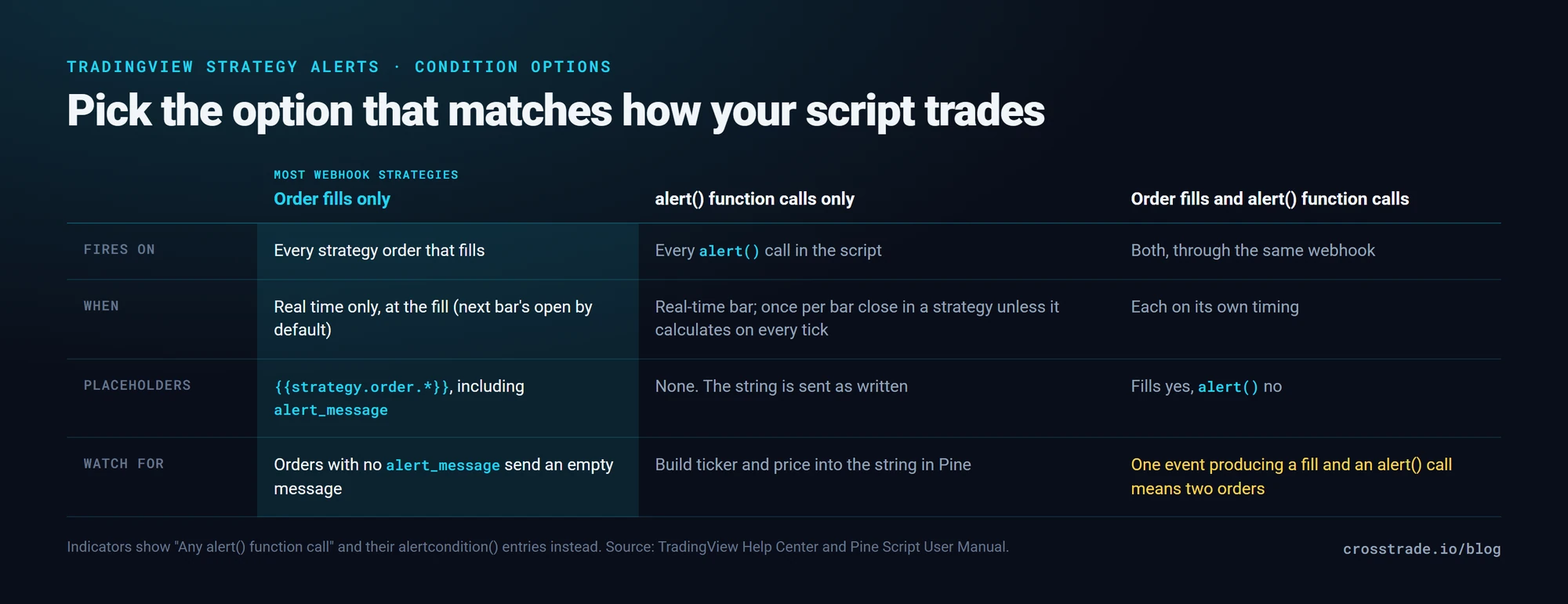
Order fills only sends one alert each time the strategy's simulated broker fills an order: every strategy.entry(), strategy.exit(), strategy.order() and strategy.close() that executes. The message can use the {{strategy.order.*}} placeholders, including {{strategy.order.alert_message}}.
alert() function calls only ignores fills completely. An alert fires only when the script calls alert(), and the message is whatever string the script passes to it.
Order fills and alert() function calls does both. Every fill sends an alert and every alert() call sends an alert, through the same webhook.
When order fill alerts fire
Fill alerts fire only in real time. Historical fills, the ones you see on the chart from the backtest, never send alerts.
By default a strategy calculates once per bar, at the close, and its orders fill at the next bar's open. So an entry signal on a 5-minute bar that closes at 10:05 fills, and alerts, as the 10:05 bar opens. Two strategy settings change this:
process_orders_on_close=true fills orders on the closing tick of the bar that generated them, so the alert fires a bar earlier. TradingView warns about using it with live execution, because the price your broker gets is the next tick, not the close the backtest assumed.
calc_on_every_tick=true runs the strategy on every real-time tick, so orders can fill and alert during a bar. The cost is repainting: a signal can appear mid-bar and vanish before the close, after the alert has already gone out. The repainting guide covers how to test for it.
A reversal is one order. When a strategy that is long 1 contract calls strategy.entry() short for 1, TradingView fills a single sell of 2 contracts, and {{strategy.order.contracts}} carries 2. Send that to CrossTrade as action={{strategy.order.action}};qty={{strategy.order.contracts}}; and the account goes from long 1 to short 1, matching the strategy.
When alert() calls fire
alert() fires only on the real-time bar, with a frequency you pass as its second argument:
alert.freq_once_per_bar(the default): the first call on each bar.alert.freq_once_per_bar_close: only when the bar closes.alert.freq_all: every call, on every tick it happens.
There's a catch in strategies. Unless the strategy uses calc_on_every_tick=true, it only runs at bar close, so every alert() call behaves as once-per-bar-close whatever frequency you pass. In an indicator, which runs on every tick, the frequency does exactly what it says.
Placeholders work differently in each
This is where most broken webhook messages come from.
Under Order fills, the alert's Message field can use the strategy placeholders: {{strategy.order.action}}, {{strategy.order.contracts}}, {{strategy.order.price}}, {{strategy.order.id}}, {{strategy.order.comment}}, {{strategy.order.alert_message}}, {{strategy.position_size}}, {{strategy.market_position}}, {{strategy.prev_market_position}} and the rest. TradingView fills them in for the order that just filled.
Under alert() calls, TradingView sends the string you passed to alert() and processes no placeholders in it. If you need the price or the ticker in the message, build it into the string in Pine with str.tostring(close) or syminfo.ticker.
Inside Pine, alert_message doesn't process placeholders either. strategy.entry("Long", strategy.long, alert_message="qty={{strategy.order.contracts}}") sends the braces literally. Build the value in Pine instead, then put {{strategy.order.alert_message}} alone in the alert's Message field. Orders placed without an alert_message send an empty string under that placeholder, and an empty message fails at CrossTrade with nothing to act on.
Which one to pick
Your strategy places all of its orders through strategy.* calls: use Order fills only. Every entry and exit becomes exactly one alert at the moment it fills, the broker follows the strategy, and nothing else fires. This is the setup for nearly every webhook strategy.
You want messages that aren't orders, such as a scheduled flatten, a stop move, or a notification: use alert() function calls only, and have the script call alert() for those events.
You genuinely need both: use Order fills and alert() function calls, and make sure no event produces both a fill and an alert() call. If your script calls alert() at the same moment it calls strategy.entry(), and you pick the combined option, the account gets two orders for one signal. It is one of the most common causes of doubled positions from strategy alerts.
Someone else wrote the script and it's closed-source: the script's description should say which option it was built for. If it uses alert() for its signals and also places strategy orders, pick one option, not both.
A worked example for CrossTrade
Here's a minimal Pine v6 strategy that builds the whole CrossTrade message per order. Replace the key with your own secret key and the account with yours.
//@version=6
strategy("SMA cross to CrossTrade", overlay = true)

fast = ta.sma(close, 9)
slow = ta.sma(close, 21)

msg(string side) =>
    "key=your-secret-key;command=place;account=Sim101;instrument=" + syminfo.ticker + ";action=" + side + ";qty=1;order_type=market;tif=day;"

if ta.crossover(fast, slow)
    strategy.entry("Long", strategy.long, alert_message = msg("buy"))
if ta.crossunder(fast, slow)
    strategy.entry("Short", strategy.short, alert_message = msg("sell"))
Create the alert with Condition set to this strategy and Order fills only, and put this alone in the Message field:
{{strategy.order.alert_message}}
Then point the webhook URL at CrossTrade. The alert_message guide goes further, with brackets computed in Pine and separate long and short payloads.
To add a scheduled exit that isn't a strategy order, add an alert() call. Because fills and alert() are now both in play, switch the alert to the combined option. The two never fire for the same event, so there's nothing to double:
// Flatten Sim101 at the close of the 3:50 PM ET bar
if hour(time, "America/New_York") == 15 and minute(time, "America/New_York") == 50
    alert("key=your-secret-key;command=flatten;account=Sim101;", alert.freq_once_per_bar_close)
If all you need is a time-based flatten, a scheduled flatten in the CrossTrade Account Manager does it without any Pine, and keeps working when TradingView doesn't.
Indicators have a different menu
An indicator has no simulated broker, so there are no fills. Its alert options are Any alert() function call, which fires on the script's alert() calls, or one of the script's named alertcondition() entries. alertcondition() messages accept the general placeholders like {{ticker}} and {{close}}, but not the {{strategy.*}} ones, which exist only for strategies. CrossTrade's Alert History flags a strategy placeholder that arrived unreplaced, which is how this mistake usually shows up.
Two things that catch everyone
Alerts are snapshots. An alert keeps the version of the script, its inputs and its properties from the moment you created it. Edit the code or change an input and the existing alert keeps running the old version. Delete it and create it again.
TradingView stops noisy alerts. A script alert that triggers more than 15 times in 3 minutes is stopped automatically. A strategy that fires on every tick with calc_on_every_tick=true can hit that in a fast market.
Frequently asked questions
What is the difference between "Order fills only" and "alert() function calls only" in TradingView?
Order fills only sends one alert each time a strategy order fills, and its message can use the strategy placeholders. alert() function calls only ignores fills and sends an alert only when the script calls alert(), with the string the script passes and no placeholders processed.
Why does my TradingView strategy send duplicate alerts?
Usually because the alert uses "Order fills and alert() function calls" and the script calls alert() on the same bar it places a strategy order. Both fire, and the webhook receives two messages. Pick "Order fills only" if the script trades through strategy.entry() and strategy.exit().
Do placeholders work inside alert()?
No. TradingView sends the alert() string as written and does not process placeholders in it. Build values such as the ticker or price into the string in Pine with syminfo.ticker or str.tostring().
Why don't strategy alerts fire on historical bars?
TradingView only sends alerts in real time. The fills you see from the backtest never trigger alerts; only fills on live bars after the alert was created do.
Do I need to recreate my alert after changing the script?
Yes. An alert keeps the script, inputs and properties from when it was created. After any change, delete the alert and create a new one.
New to CrossTrade? Start your free 7-day trial and see every alert TradingView sends in Alert History. Questions? Ask us on Discord.