Tradovate Order Rejected? Every Rejection Reason and How to Fix It
TooLate, InvalidPrice, LiquidationOnly, SessionClosed: what each Tradovate rejection reason means, how to tell a broker rejection from a blocked signal, and the fix for each.

A rejected order on Tradovate comes back with a one-word reason: TooLate, InvalidPrice, LiquidationOnly. Tradovate's platform shows the token and moves on. If the order came from a TradingView alert, you may not see it at all, only a position that never opened.
This guide translates every rejection reason Tradovate returns, groups them by what you can do about them, and shows how to tell a true broker rejection from an order that never reached Tradovate in the first place. That second case is more common than most traders expect, and the fix is completely different.
If your alert fired and nothing traded, and you don't yet know where it stopped, start with the alert fired but Tradovate did not trade checklist. This post picks up once you have a reason in hand.
Three places an order can stop
Between a TradingView alert and a fill on Tradovate there are three checkpoints, and each one fails differently.
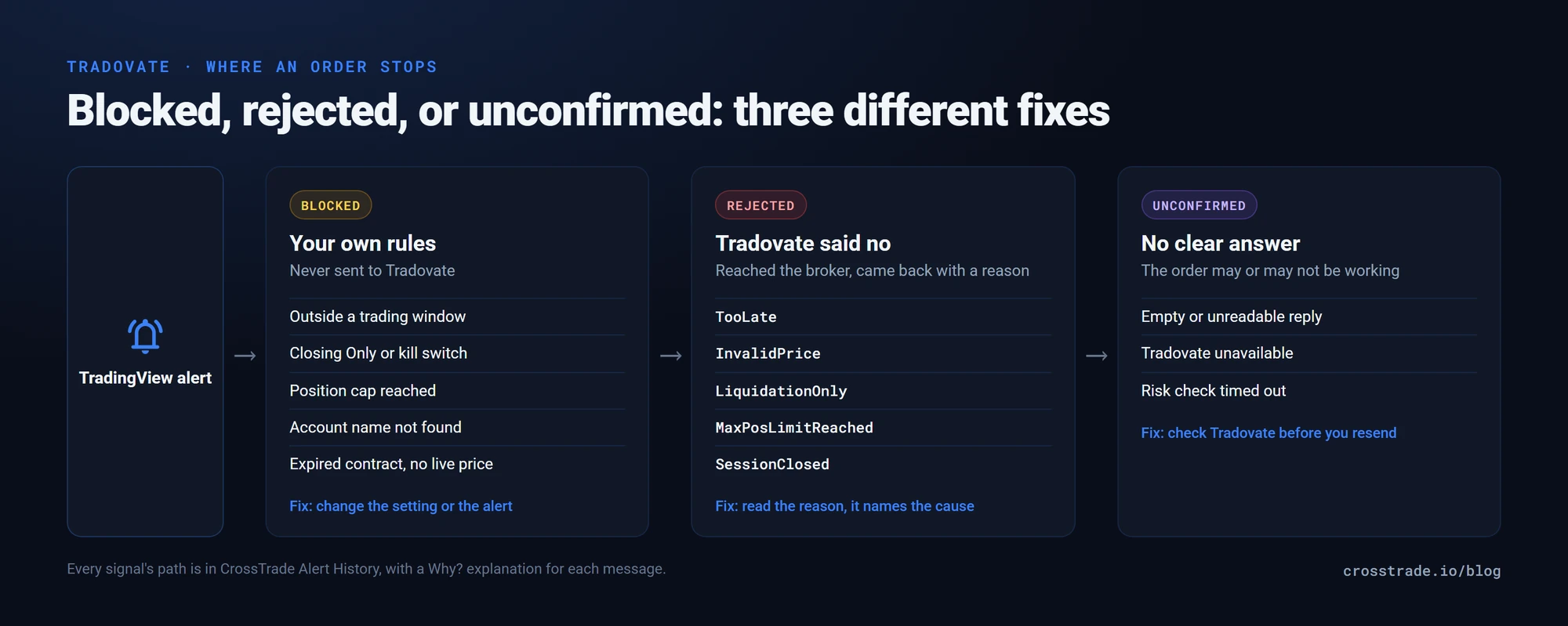
Blocked before Tradovate. Your own rules stopped the order: a trading window, Closing Only, a position cap, an account name that doesn't match. Nothing was sent to the broker, so there is nothing to find in Tradovate.
Rejected by Tradovate. The order reached the broker and its risk checks or the exchange said no. This is where the one-word reason tokens come from.
Outcome unconfirmed. Tradovate accepted the request but its reply was empty or never came. The order may or may not be working, and the next step is to check before you send anything again.
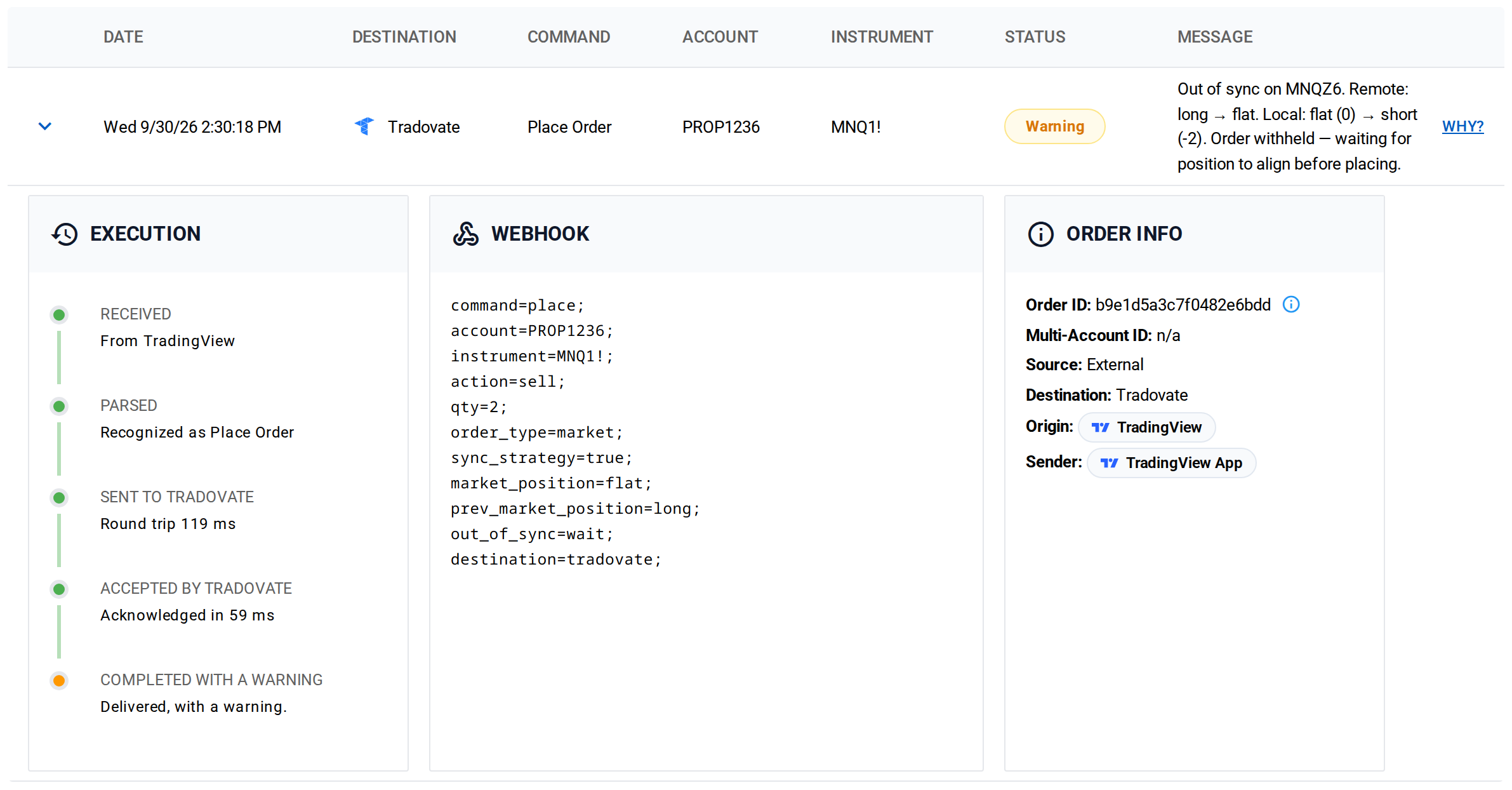
In Alert History every signal shows which of these happened, with the full path: received, parsed, sent to Tradovate with the round-trip time, and what Tradovate answered. The Why? link next to the message opens a plain-English explanation with the common causes and the fix.
Tradovate rejection reasons, translated
These are the reason tokens Tradovate returns on a rejected order, in the plain English CrossTrade shows in Alert History, and what to do about each.
Timing and order state
| Reason | What it means | Fix |
|---|---|---|
TooLate |
The order had already filled or finished, so there was nothing left to cancel or change | Usually harmless. A cancel or modify arrived after the fill. Check the position, not the order |
AnotherCommandPending |
Another change to the same order was still being processed | Space out modify signals by a second or two |
ParentRejected |
The parent order was rejected, so its linked bracket was rejected with it | Fix the parent's reason first; the bracket follows |
TrailingStopNonOrderQtyModify |
Only the size of a trailing stop can be changed | Cancel and replace the trailing stop to change its price fields |
TooLate is the one traders ask about most, and it's almost always a race, not a failure. A strategy sends an exit and a cancel at nearly the same moment; the exit fills, and by the time the cancel arrives the order no longer exists.
Price and contract
| Reason | What it means | Fix |
|---|---|---|
InvalidPrice |
The price isn't valid for this contract | Check the tick size and the current market. A limit price off the tick grid is rejected |
InvalidContract |
The contract is not valid or no longer tradable | Check the symbol and expiration. Expired months are the usual cause |
BackMonthProhibited |
Tradovate does not allow trading this back-month contract | Use the front month |
LiquidationOnlyBeforeExpiration |
The contract is near expiration and only orders that reduce a position are allowed | Roll to the next contract month |
NoQuote |
No market quote was available | The market is likely closed or in its daily break |
SessionClosed |
The market session is closed for this contract | Check the session hours, including holiday hours |
NotEnoughLiquidity |
Not enough liquidity to fill the order | Rare on index futures; common on thin contracts outside regular hours |
InvalidPrice has one cause specific to webhook trading on Tradovate. A bare number in a bracket field is a price, not a distance: take_profit=40; means a take-profit at a price of 40, which Tradovate rejects on ES. For a distance, add a unit: take_profit=40 ticks;, 5pt, a percent or a dollar amount. The TP and SL guide for Tradovate covers the formats.
The expiration-related reasons cluster around quarterly roll weeks. If you trade an alert pinned to a specific month, such as ESZ6, update it before the contract enters liquidation-only, or use the continuous symbol ES1! so CrossTrade always resolves to the contract Tradovate marks as the front month.
Account limits and status
| Reason | What it means | Fix |
|---|---|---|
MaxPosLimitReached |
The order would exceed the account's position limit for this contract | Reduce size, or check the limit with your broker or prop firm |
MaxTotalPosLimitReached |
The order would exceed the account's total position limit | Same, across all contracts |
MaxOrderQtyLimitReached |
The order size exceeds the account's maximum order size | Split the order or lower the quantity |
LiquidationOnly |
The account only accepts orders that reduce a position | Usually a risk rule: review the account status with your broker or prop firm |
TradingLocked |
Trading is locked on this account | Contact your broker or prop firm |
AccountClosed |
The account is closed at the broker | Use a different account; a failed evaluation is a common cause |
MultipleAccountPlanRequired |
Your Tradovate plan does not allow trading multiple accounts | Change the plan at Tradovate |
Unauthorized |
The account is not authorized for this action | Check permissions with Tradovate |
KeyInformationDocumentRequired |
The account must accept a Key Information Document before trading this product | Accept it in Tradovate, then resend |
On prop firm accounts, LiquidationOnly and TradingLocked usually mean a firm rule tripped: a daily loss limit, a drawdown breach, or an end-of-day cutoff. Neither CrossTrade nor your alert can lift them. The firm's dashboard will tell you which rule it was.
Broker-side problems
| Reason | What it means | Fix |
|---|---|---|
ExecutionProviderUnavailable |
Tradovate's execution provider was unavailable | Wait and resend |
ExecutionProviderNotConfigured |
The account's execution provider is not set up at Tradovate | Contact Tradovate support |
MaxOrderQtyIsNotSpecified / MaxPosLimitMisconfigured |
The account's limits are not configured at Tradovate | Contact Tradovate support |
RiskCheckTimeout |
Tradovate's risk check did not finish in time | Check the order in Tradovate before resending |
UnknownReason / OtherExecutionRelated |
Tradovate declined without a specific reason | Check the order in Tradovate |
Tradovate occasionally returns a reason that isn't on its documented list. CrossTrade shows those as readable words (InvalidOrderState becomes "invalid order state") rather than a bare token, so you always have something to search for.
Blocked before it reached Tradovate
If Alert History shows the signal as blocked rather than rejected, the broker never saw it. These are the usual reasons, and every one of them is a setting you control:
Outside a trading window. The signal arrived outside a window set in your Master Controls, the Account Manager or the alert itself. Holidays and early closes catch people here; see the 2027 CME holiday hours.
Closing Only or a kill switch. The account accepts exits only, or all trading is off. Both are deliberate switches, set by you or by an Account Manager rule that fired.
A position cap. The order would take the account past its max_position limit.
Account not found or used twice. The account name in the alert doesn't match any account on your connected Tradovate login, or matches accounts on two logins. Names are compared without regard to capital letters, so PROP1234 and prop1234 count as the same name.
Contract expired or no live price. A relative bracket (ticks, points, percent) needs a live price to convert. An alert that names an expired month, or arrives during the daily 4:00 to 5:00 PM CT break, can't be priced, and CrossTrade won't price it off stale data.
Session expired. The Tradovate connection needs to be reauthorized in My Account, then Brokers.
Outcome unconfirmed: check before you resend
Two messages mean the order may or may not exist at Tradovate: "outcome could not be confirmed" and "Tradovate was temporarily unavailable". The second means the order was not placed. The first does not: Tradovate accepted the request but its reply was empty, so the order could be working.
For an unconfirmed outcome, open Tradovate and check working orders and positions before you resend. Resending blind is how a single signal turns into a double position.
Rate limits are their own category
If Alert History says Tradovate is rate-limiting requests, the broker has applied a penalty window to your login. The limit is per Tradovate login, so other apps connected to the same login count against it. CrossTrade pauses for the penalty window rather than retrying into it, which would extend the penalty. The Tradovate rate limits post explains the limits and how to stay under them.
Frequently asked questions
What does TooLate mean on Tradovate?
It means the order had already filled or finished when a cancel or change arrived, so there was nothing left to act on. It's usually a harmless race between an exit filling and a cancel arriving. Check the position rather than the order.
Why does Tradovate say InvalidPrice?
The price isn't valid for the contract: it's off the tick grid, or outside the allowed range. On webhook orders, a common cause is a bare number in a bracket field, such as take_profit=40;, which Tradovate reads as a price of 40. Add a unit for a distance: take_profit=40 ticks;.
What does LiquidationOnly mean on Tradovate?
The account only accepts orders that reduce a position. On prop firm accounts it usually means a firm rule tripped, such as a daily loss limit. LiquidationOnlyBeforeExpiration is different: the contract is about to expire, and the fix is to trade the next contract month.
How do I know if Tradovate rejected my order or it never got there?
Check Alert History. A blocked signal stopped at your own rules and was never sent; a rejected signal reached Tradovate and shows Tradovate's reason. The execution timeline shows each step, with the round-trip time to Tradovate.
Should I resend an order after an error?
Only after checking. If the message says the outcome could not be confirmed, look at working orders and positions in Tradovate first, because the original may be live. If it says the order was not placed or was rejected, fix the reason and resend.
New to CrossTrade? Start your free 7-day trial and see the full path of every alert in Alert History. Questions? Ask us on Discord.