
How Fast Is CrossTrade? 34ms Average from Webhook to NinjaTrader
CrossTrade delivers webhook alert instructions to NinjaTrader in an average of 34 milliseconds. Here's how we measure it and what affects your execution speed.

The average time for CrossTrade to receive a webhook, validate it, and deliver the order instruction to NinjaTrader's Automated Trading Interface is 34 milliseconds. That number comes from hundreds of thousands of daily webhook executions across our entire user base.
This post breaks down what that 34ms includes, what it doesn't, and what you can do to keep your execution as fast as possible.
What the 34ms Measures
CrossTrade records two timestamps for every webhook that passes through the system:
Received is the moment the webhook POST request hits CrossTrade's servers. This is when your alert enters our infrastructure.
Sent is the moment the validated instruction is pushed through the WebSocket connection to the XT Add-On running inside your NinjaTrader instance.
The difference between those two timestamps is what we report as execution time. It represents the total time CrossTrade spends doing its job: TLS termination, payload parsing, key authentication, command mapping, enhancement processing (Flatten First, multi-account splitting, Strategy Sync validation, strategy tag checks), and WebSocket delivery.
The 34ms average is the current benchmark. When CrossTrade originally launched as a Windows desktop application, the average was 194ms. The difference comes down to architecture. The old app received instructions over HTTP, wrote Order Instruction Files to a folder on disk, and waited for NinjaTrader to detect and ingest those files. The current XT Add-On runs inside NinjaTrader and receives instructions over a persistent WebSocket connection, then submits orders directly through ATI within the same process. No disk I/O, no file polling, no inter-process handoff.
What the 34ms Doesn't Include
Two things happen outside of CrossTrade's control that add time to the total chain:
TradingView's webhook dispatch. When your alert condition triggers, TradingView queues the webhook POST request on their servers. The time between "alert triggered" and "webhook sent" varies. Under normal conditions it's fast — usually under a second. During heavy load (market opens, major news events, high-traffic TradingView hours), we've observed delays of several seconds and occasionally longer. CrossTrade can't influence this. The 34ms clock starts when TradingView's request arrives at our servers, not when your alert fires.
NinjaTrader's order processing. After the XT Add-On submits the order through ATI, NinjaTrader handles routing, broker communication, and fill confirmation. This is standard NT8 order processing and depends on your broker connection, data feed latency, and market conditions. For market orders during active trading hours, this is typically sub-second.
The full chain from alert trigger to fill confirmation is TradingView dispatch time + CrossTrade's 34ms + NinjaTrader order processing. CrossTrade is the smallest component of that chain.
Where to See Your Execution Times
Every webhook that reaches CrossTrade is logged with timestamps in two places:
Alert History on the CrossTrade dashboard shows every inbound request with received time, execution status, and delivery confirmation. You can filter by date, account, and status to review specific signals.

The XT Add-On log inside NinjaTrader shows every instruction received and the resulting ATI action, including order submission confirmations and any errors.
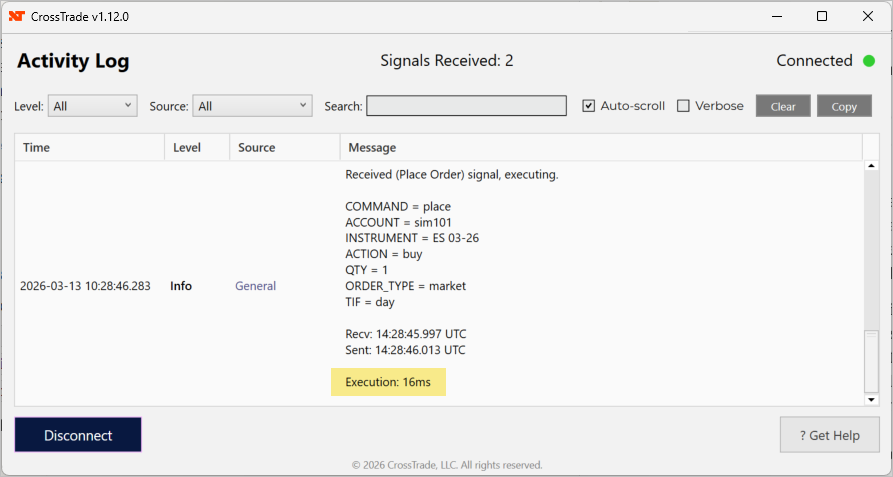
Between these two, you can trace any signal from the moment it hit CrossTrade to the moment NinjaTrader acted on it.
What Affects Your Speed
The 34ms average accounts for the server-side pipeline. The WebSocket delivery leg depends on network conditions between CrossTrade's servers and your NinjaTrader instance. A few factors influence this:
Geographic proximity matters. If you're running NinjaTrader on a CrossTrade VPS in Chicago, the WebSocket hop is measured in single-digit milliseconds — both CrossTrade's infrastructure and CME Group's matching engines are in the same metro area. If you're running NinjaTrader on a home PC across the country, that hop could be 30-60ms depending on your ISP.
Connection stability matters more than raw speed. A consistent 50ms connection beats a connection that alternates between 10ms and 500ms. The XT Add-On's auto-reconnect feature handles brief interruptions, but frequent disconnections mean missed delivery windows. A VPS with a dedicated connection eliminates this variable entirely.
Enhancement complexity adds marginal time. A simple PLACE command with no enhancements processes faster than a command with Strategy Sync validation, multi-account splitting across 10 accounts, and a strategy tag check. The difference is small — milliseconds, not seconds — but it's nonzero. If you're optimizing for absolute minimum latency, simpler commands are faster commands.
TradingView Webhook Delays
This comes up often enough that it's worth addressing directly. TradingView's webhook dispatch is not instant, and CrossTrade has no ability to speed it up. We've observed cases where TradingView logs an alert at one timestamp but doesn't actually send the webhook POST for seconds afterward. This is a TradingView infrastructure issue, not a CrossTrade issue.
If you're seeing execution times that feel slow, check the Alert History timestamps. If the gap between your TradingView alert time and CrossTrade's Received timestamp is large, the delay is on TradingView's side. If the gap between Received and Sent is large (anything over 100ms is unusual), reach out to us — that's our problem and we want to know about it.
Want to see these numbers yourself? Start a free 7-day trial and send a test webhook to your sim account. Every signal is timestamped in Alert History so you can verify the speed firsthand. For the full technical breakdown of the signal pipeline, see How CrossTrade Sends Signals from TradingView to NinjaTrader.