
How CrossTrade Sends Signals from TradingView to NinjaTrader
A technical breakdown of how a TradingView webhook becomes an executed order on NinjaTrader 8 in under 50 milliseconds through CrossTrade's signal pipeline.

When you fire a TradingView alert with a CrossTrade webhook, the order hits NinjaTrader in roughly 34 milliseconds on average. That number has been consistent across hundreds of thousands of daily webhook executions. But what actually happens during those 34 milliseconds? This post walks through the full signal path from TradingView alert to NinjaTrader order execution, covering each layer of the pipeline and the design decisions behind it.
If you're evaluating CrossTrade for live trading and want to understand the architecture before trusting it with real capital, this is the post for you.
The Signal Path
The full lifecycle of a CrossTrade signal has four stages:
TradingView fires the webhook → CrossTrade's servers validate and route the payload → the XT Add-On inside NinjaTrader receives the instruction over a persistent WebSocket → the Add-On submits the order through NinjaTrader's Automated Trading Interface (ATI).
Each stage is purpose-built to minimize latency and maximize reliability. Here's how they work.
Stage 1: TradingView Fires the Webhook
When your alert condition triggers, TradingView sends an HTTP POST request to your CrossTrade webhook URL. The body of that request is the alert message you configured — a semicolon-delimited string of key=value pairs that contains everything CrossTrade needs: your secret key, the command type, account, instrument, action, quantity, order type, and any enhancements like ATM strategies, brackets, or multi-account placement.
A typical payload looks like this:
key=your-secret-key;
command=place;
account=sim101;
instrument=ES 06-26;
action=buy;
qty=1;
order_type=market;
tif=day;
strategy_tag=MyStrategy;
TradingView's webhook delivery is fire-and-forget. Once the POST request leaves their servers, TradingView's job is done. Everything after that is on CrossTrade's infrastructure.
Stage 2: Server-Side Validation and Routing
CrossTrade's servers sit behind a proxy layer that handles TLS termination and initial request filtering. When a webhook arrives, the first thing that happens is payload validation.
The parser checks structural integrity before touching the content. The payload format requires that every parameter follows the key=value; pattern — specifically, the count of = signs must match the count of ; delimiters. If they don't match, the request is rejected before it goes any further. This catches malformed payloads, truncated messages, and injection attempts at the gate.
Once structural validation passes, the server authenticates the request using your secret key, maps the command parameters to the appropriate NinjaTrader ATI command, and applies any CrossTrade-specific enhancements. Multi-account placement splits a single inbound webhook into separate instructions for each target account. Flatten First checks for existing positions and issues a close before the new entry. Strategy Sync compares the expected strategy state against the actual NinjaTrader position to catch state drift before it causes problems. Strategy Tagging ensures the signal only interacts with positions owned by the same tag.
All of this processing happens server-side, before the instruction ever reaches your NinjaTrader instance. The heavy lifting runs on CrossTrade's infrastructure so your NT8 stays lightweight and fast.
Stage 3: WebSocket Delivery to the XT Add-On
The XT Add-On maintains a persistent WebSocket connection to CrossTrade's servers. This is a long-lived, bidirectional channel — not a polling loop. The Add-On doesn't repeatedly ask "any new signals?" It holds an open connection and receives instructions the instant they're ready.
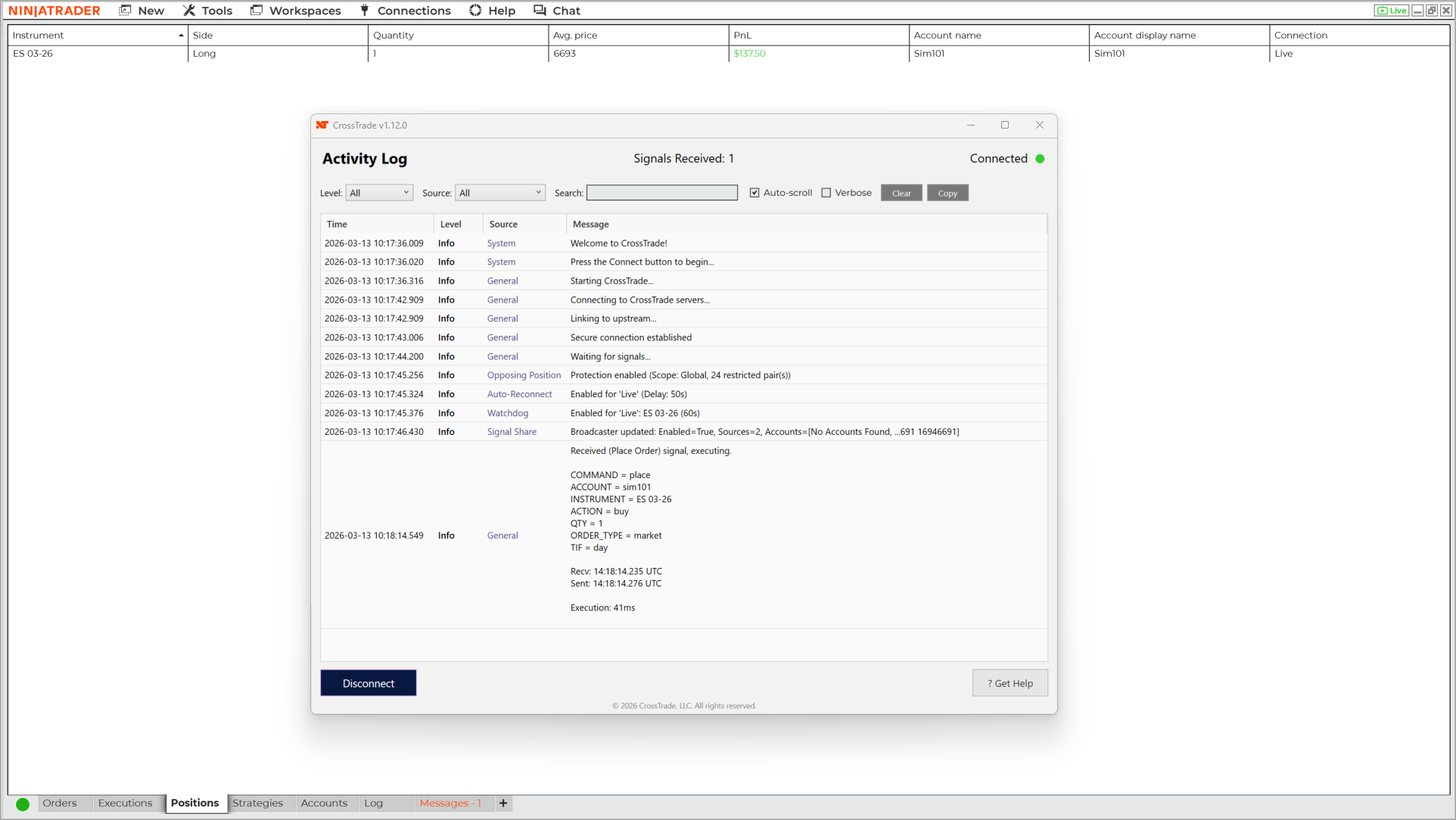
This design choice is critical for latency. An HTTP polling approach would introduce a minimum delay equal to the polling interval (typically 1-5 seconds). A WebSocket connection has near-zero delivery latency because the channel is already open. When the server has an instruction to deliver, it pushes it through the existing connection immediately.
The WebSocket connection also provides health monitoring. CrossTrade tracks connection uptime and responsiveness, surfacing this data through the NT8 Health Monitor on your dashboard. If the connection drops — due to an internet interruption, a NinjaTrader restart, or a VPS hiccup — the Add-On's auto-reconnect feature re-establishes the channel automatically. During a disconnection, any inbound webhooks are held server-side and acknowledged back to TradingView so they aren't lost or retried.
Stage 4: ATI Execution on NinjaTrader
Once the XT Add-On receives the validated instruction, it submits the order through NinjaTrader's Automated Trading Interface. ATI is NinjaTrader's built-in system for accepting external order commands — it's the same interface that NinjaScript strategies and third-party add-ons use to place trades programmatically.
The Add-On translates the CrossTrade command into the specific ATI call: a PLACE command becomes an order submission, a CLOSEPOSITION flattens the instrument on the specified account, a REVERSE closes and enters in the opposite direction. If an ATM strategy is specified, the Add-On attaches it to the order so NinjaTrader handles bracket management (stop loss, take profit, trailing stops) locally.
This is where the "last mile" advantage of running as a native NinjaTrader Add-On matters. The XT Add-On executes inside the NinjaTrader process. There's no inter-process communication, no localhost HTTP call, no external application bridging to NT8 through a socket. The instruction goes from the Add-On directly to ATI within the same application. The result is sub-millisecond local execution after the WebSocket message is received.
What About the Return Trip?
The signal flow from TradingView to NinjaTrader is one-directional for order execution. TradingView fires, CrossTrade routes, NinjaTrader executes. NinjaTrader does not send execution confirmations back to TradingView.
However, the XT Add-On does send execution data back to CrossTrade's servers for your dashboard — alert history, fill confirmations, position state, and account data. This powers the Alert History page, the Trade Copier's synchronization logic, and the REST API endpoints that let you query account state programmatically. If you're building external tools or monitoring systems, the API gives you read access to everything happening inside NinjaTrader.
Why This Architecture
Every design decision in the pipeline serves one of two goals: minimize latency or maximize reliability.
Running validation and enhancement logic server-side means your NinjaTrader instance doesn't waste cycles parsing webhooks or checking strategy state. The WebSocket connection eliminates polling latency. The native Add-On eliminates inter-process overhead. And the entire chain from webhook received to ATI instruction averages 34 milliseconds, with the server-side processing and WebSocket transit accounting for the bulk of that time.
For traders running on a CrossTrade VPS in Chicago, the WebSocket hop between CrossTrade's servers and NinjaTrader is measured in single-digit milliseconds due to geographic proximity to both our infrastructure and CME Group's matching engines.
The architecture also means that adding new features — like Strategy Tagging, CancelAndBracket, or the Automation Wizard — doesn't slow down the core signal path. Enhancements are processed server-side before the instruction is pushed to the Add-On, so the Add-On itself stays lean and focused on order execution.
Want to see this pipeline in action? Start a free 7-day trial and send your first webhook to NinjaTrader's sim account. The Webhook Trader lets you test payloads without placing real orders. When you're ready to build alert messages, the Automation Wizard walks you through it step by step.